Medical care cost information
The Health Insurance Society prepares "medical care cost information" so that you can check how much you paid in medical care costs and review the actual medical care costs.
- Check the actual medical care costs using your "medical care cost information" and receipts or detailed statements.
How much do hospitals and clinics actually charge for the medical treatment they provide?
Insured persons and dependents pay only 30 percent of their medical care cost respectively, at the hospital upon the receipt of treatment. When hospitalized, insured persons and dependents must cover the standard amounts for meals and living expenses. It is difficult under this system for insured persons and dependents to determine the actual cost of treatment.
You can review the medical care cost information and the notice of the payment amount of High-Cost Medical Care Benefits or other benefits on the Society website.
Click here to log in to the Web service. (This service is only available in Japanese.)
KOSMO Web Login
Click here to log in to KOSMO Web
First-Time Login Manual (This manual is only available in Japanese.)
Inquiries: Daiwa Login Support Center
Dedicated telephone number: 0570-024-054
- * The login URL has changed. Please update your bookmarks or favorites.
First-time login ID/password
Your password is your health insurance code + number + date of birth (eight digits). (Note 2)
Your password is your health insurance code + number + date of birth (eight digits). (Note 2)
- Note 1: In the new KOSMO Web, all letters in user IDs are treated as lowercase letters. If you are unsure of your previous user ID, contact the Health Insurance Society.
- Note 2: The password has been reset to your health insurance code + number + date of birth.
Example: If your code is 12, your number is 3456789, and you were born on December 1, 1980 ⇒ Enter 12345678919801201 as your password.
- * After logging in for the first time, please change your password.
The password you set after login must be 8 to 64 characters long and include at least one letter and one number. - * If you are unsure of your code and number, refer to your Health Insurance Eligibility Certificate, Notice of Eligibility Information, or the “Health Insurance Certificate” screen on Mynaportal.
- Reference link
Contact information for login inquiries * Inquiries must be made by the insured person.
- * Direct any inquiries about benefit details to staff in charge of benefits in the First Operation Section or Second Operation Section.
Direct inquiries about login problems or related matters to the KOSMO Web to the number below.
Dedicated telephone number: 0570-024-054
Hours: 9:00 am – 5:00 pm weekdays * Closed weekends, holidays, and during the year-end/New Year holidays
Call charges are payable by the caller. (Navi Dial)
Please note that the number may be difficult to reach depending on inquiry volume.
Email inquiries (Inquiries are handled on weekdays only. Responses will generally be provided within five days.)
| To: | kosmoweb.support.485@cck.co.jp |
|---|---|
| Subject: | KOSMO-WEB login inquiry |
| Contents | Note that we may be unable to respond if the information under ①-⑦ below does not match the information registered with the Society. ①Tokyo Securities Industry Health Insurance Society ②Company name ③Health insurance code and number ④Name and address of insured person (employee) ⑤Name of inquirer ⑥Name and date of birth (Japanese calendar) of the person for whom login is required ⑦Relationship of the person for whom login is required to the insured person ⑧Device and operating system being used: PC (Windows or Mac) or smartphone (Android or iPhone) ⑨Details of your inquiry |
The previous KOSMO Web is here (The previous site will close at the end of September 2026)
Web Service Login
Reissue of ID and password

* User registration is required to use the service (for first-time users).
About user registration (This manual is only available in Japanese.)
(Please have the postcard informing of the web service ready for user registration.)
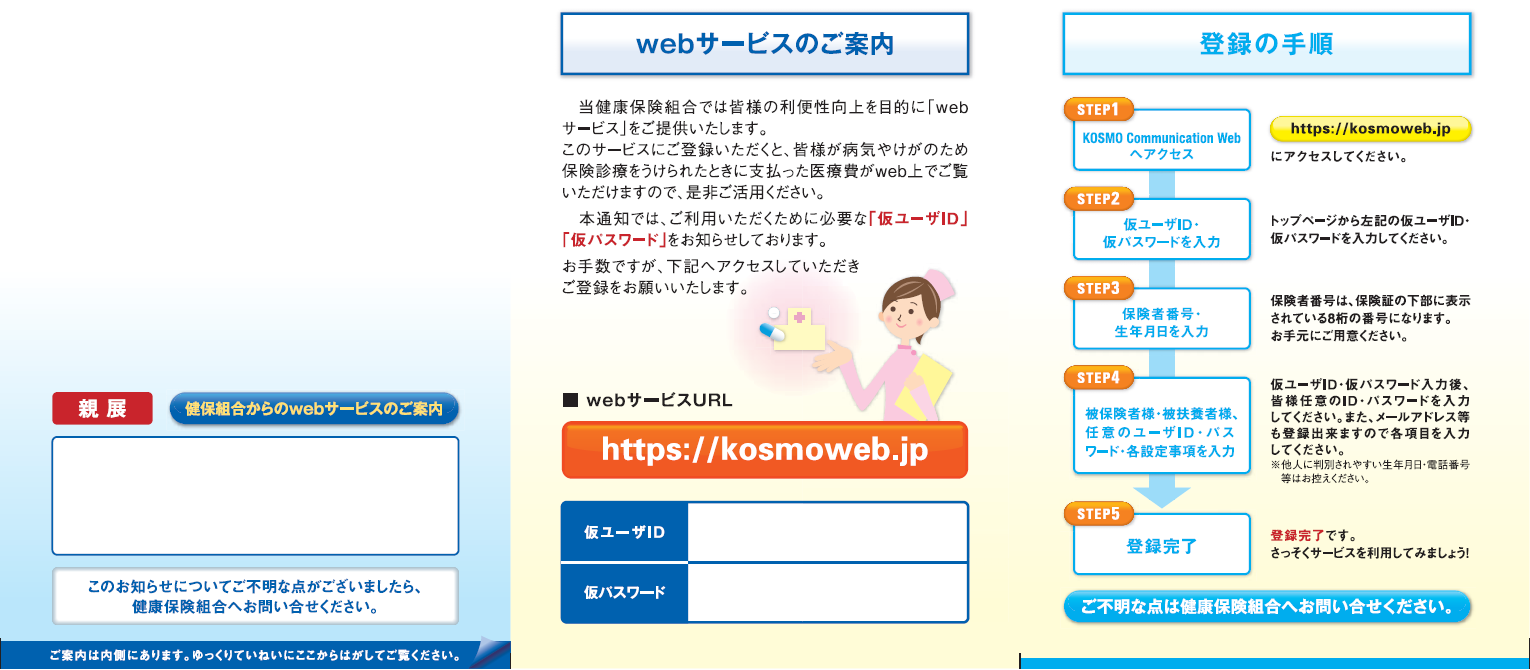
- Reference link
Assessment of reduced payment
If you or a family member is treated for an illness or injury at a medical care institution, the institution will submit a bill for the cost of the treatment to the Health Insurance Claims Review & Reimbursement Services (HICRRS).
The HICRRS will review the appropriateness of the items and amounts invoiced. Based on this review, the amount billed may be reduced.
The Health Insurance Society notifies (*) individuals for whom such reviews have identified reductions of 10,000 yen or more in copayments paid at medical care institutions.
- * Check the Web service (medical care cost inquiries: https://shokenkenpo.portal.kosmo-web.jp) for notifications.
“Assessment of reduced payment” is indicated in the remarks field on the medical care cost inquiry screen.
If you are notified of an assessment of reduced payment
If your medical care cost information indicates an assessment of reduced payment, you can request a refund of the amount you overpaid in your copayment or other payments from the medical care institution.
Note that if the medical care institution requests reexamination by the HICRRS, the overpaid amount will not be refunded immediately. Additionally, if reexamination assesses that the medical care was appropriate, your refund request may be rejected altogether.
Submit refund requests directly to medical care institutions. Do not submit to the Health Insurance Society.
- Reference link